Feature Reference
Every feature available in project update pages, with copy-paste examples
This page demos every feature. Copy what you need. The table of contents on the left is auto-generated from your h2/h3 headings. Copy buttons appear on hover over any code block. Heading anchors appear on hover over any heading (click to get a shareable link).
Inline math (KaTeX)
KaTeX is loaded on all pages. Use $$...$$ with single backslashes.
Inline: the CVaR objective is \(\text{CVaR}_{\alpha}(L) = \inf_{\tau} \left\{ \tau + \frac{1}{\alpha} \mathbb{E}[\max(L - \tau, 0)] \right\}\) where \(\alpha \in (0,1]\) controls robustness.
Display math with \[...\]:
[\nabla\theta \mathcal{L}(\theta) = \frac{1}{\alpha B} \sum{i \in \mathcal{S}\alpha} \nabla\theta \ell(x_i; \theta)]
where \(\mathcal{S}_\alpha\) is the worst-\(\alpha\) fraction of the batch.
Inline: $$\alpha \in (0,1]$$
Display: \[\nabla_\theta \mathcal{L}\]
LaTeX tables (SVG via bin/render-table)
Write a .tex file with just the tabular, run bin/render-table in.tex out.svg. Click to zoom.
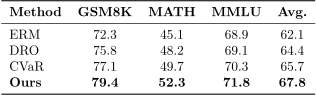
results.tex using booktabs. Vector-crisp at any zoom.% results.tex — just the tabular, no preamble
\begin{tabular}{l c c c c}
\toprule
\textbf{Method} & \textbf{GSM8K} & \textbf{MATH} & \textbf{Avg.} \\
\midrule
ERM & 72.3 & 45.1 & 62.1 \\
\textbf{Ours} & \textbf{79.4} & \textbf{52.3} & \textbf{67.8} \\
\bottomrule
\end{tabular}
bin/render-table assets/project-updates/examples/results.tex assets/project-updates/examples/results.svg
Static figures (matplotlib + SciencePlots)
bin/mpl-web-svg applies SciencePlots styling and web-optimized SVG export. Three lines:
import scienceplots
plt.style.use(['science', 'no-latex', 'bright'])
mpl.rcParams['svg.fonttype'] = 'none'
fig.savefig('out.svg', bbox_inches='tight', transparent=True)
Or wrap any script: bin/mpl-web-svg my_plot.py
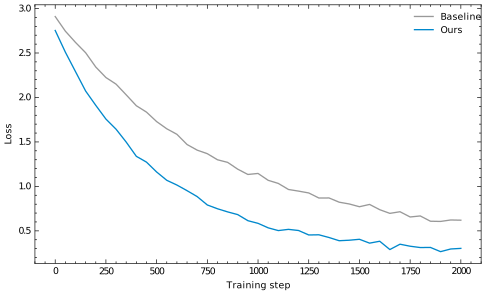
['science', 'no-latex', 'bright']. Text stays selectable in the SVG.D3 charts (shared module)
The charts.js module provides reusable chart types. Load D3 and the module at the top of your page.
Loss curves with metric toggle
<script src="https://cdn.jsdelivr.net/npm/d3@7/dist/d3.min.js"></script>
<script src="/assets/project-updates/shared/charts.js"></script>

<div id="d3-chart" style="width:100%;max-width:700px;margin:1.5em auto;"></div>
<script>
  charts.lossCurves("#d3-chart", "/assets/project-updates/slug/data.json", {
    series: [
      { key: "baseline", label: "Baseline", color: "#999", dash: "6,3" },
      { key: "ours", label: "Ours", color: "#08c" },
    ],
    metrics: [
      { key: "mean", idx: 1, label: "Mean loss" },
      { key: "tail", idx: 2, label: "Tail loss" },
    ],
  });
</script>
Interactive charts (Altair / Vega-Lite)
Vega-Lite is loaded on all pages. Generate JSON specs in Python with Altair, embed with one <script> tag.
Line chart
Click legend entries to isolate a series. Pan and zoom with mouse.
import altair as alt
selection = alt.selection_point(fields=['method'], bind='legend')
chart = (alt.Chart(df)
    .mark_line(strokeWidth=2)
    .encode(
        x=alt.X('step:Q', title='Training step'),
        y=alt.Y('loss:Q', title='Loss', scale=alt.Scale(zero=False)),
        color=alt.Color('method:N', scale=alt.Scale(
            domain=['Baseline', 'Ours'], range=['#999', '#08c'])),
        opacity=alt.condition(selection, alt.value(1), alt.value(0.15)),
    )
    .add_params(selection)
    .interactive()
)
chart.save('line_chart.json')
Scatter plot with tooltips
Hover for details. Drag to pan, scroll to zoom.
Grouped bar chart
Heatmap (hyperparameter sweep)
Brush zoom (focus + context)
Drag on the lower chart to zoom the upper chart.
Embedding pattern
chart.save('assets/project-updates/<slug>/my_chart.json')
<div id="my-chart"></div>
<script>
  vegaEmbed("#my-chart", "/assets/project-updates/<slug>/my_chart.json", { actions: false });
</script>
Reactive parameter widgets
Drag the slider below to change \(\alpha\). The chart highlights the selected point, and the text values here update in sync:
At \(\alpha\) = 0.10, mean accuracy is 79.4% and tail accuracy is 73.2%.
The reactive.js module binds Vega-Lite chart signals to inline <span> elements. When a reader adjusts a slider, the corresponding text values update.
<!-- Inline reactive values -->
At α = <span class="reactive-value" data-signal="alpha_val" data-format=".2f">0.10</span>, mean accuracy is
<span class="reactive-value" data-signal="alpha_val" data-lookup="mean_accuracy" data-format=".1f">79.4</span>%.

<!-- Chart with slider -->
<div id="reactive-chart"></div>
<script>
  reactive.embed("#reactive-chart", "/path/spec.json", {
    data: "/path/data.json", // lookup table (array of objects)
    key: "alpha", // field to match signal value
    signals: ["alpha_val"], // signal names to watch
  });
</script>
Generate the chart in Python with a bound parameter:
alpha_slider = alt.param(
    name="alpha_val", value=0.1,
    bind=alt.binding_range(min=0.05, max=1.0, step=0.05, name="CVaR α: ")
)
chart = (alt.Chart(df)
    .mark_circle(size=200)
    .encode(x='alpha:Q', y='accuracy:Q')
    .transform_filter(alt.datum.alpha == alpha_slider)
    .add_params(alpha_slider)
)
chart.save('reactive_chart.json')
Inspector panel
A slideout panel for showing details without cluttering the page. Two modes:
Inline content
Hide content in a div.inspect-content, link to it with data-inspect.
Detailed derivation
The CVaR can be written as:
CVaR_α(L) = inf_τ { τ + (1/α) E[max(L - τ, 0)] } When α = 1, this reduces to the expected loss (standard ERM).
When α → 0, this approaches the worst-case loss.
Click to open the inspector: view derivation
<div class="inspect-content" id="detail-example">
  <h3>Detailed derivation</h3>
  <p>The CVaR can be written as: ...</p>
</div>

<a data-inspect="#detail-example" data-inspect-title="CVaR Derivation">view derivation</a>
Remote JSON (trajectory viewer)
Fetches JSON and auto-renders arrays with role/content fields as collapsible step lists.
<a data-inspect-src="/path/to/trajectory.json" data-inspect-title="Example Trajectory"> View agent trajectory </a>
Programmatic API
inspector.show({ title: "My Panel", html: "<p>Any HTML</p>" });
inspector.show({ title: "Steps", steps: [{ role: "user", content: "..." }] });
inspector.show({ title: "Remote", url: "/path/to/data.json" });
inspector.close();
Collapsible sections
Use HTML <details>/<summary>. Note: markdown does not render inside HTML blocks, so use HTML or <img> tags for content.
Experiment configuration
model: Qwen2.5-Math-1.5B-Instruct
dataset: GSM8K (train split)
batch_size: 32
learning_rate: 1e-4
optimizer: AdamW
cvar_alpha: 0.1
steps: 2000
<details>
  <summary>Experiment configuration</summary>
  <pre>
model: Qwen2.5-Math-1.5B-Instruct
learning_rate: 1e-4
cvar_alpha: 0.1
</pre
  >
</details>
Zoomable images
All <img> tags in articles are automatically zoomable via medium-zoom. Click any image to expand it. SVGs do not get a box-shadow (clean look for diagrams).
Code highlighting
Jekyll Rouge handles syntax highlighting in fenced code blocks. Hover to reveal the copy button.
def cvar_loss(losses, alpha=0.1):
    """Compute CVaR: average of worst-alpha fraction."""
    k = max(1, int(alpha * len(losses)))
    topk = torch.topk(losses, k).values
    return topk.mean()
# Render a table and rebuild figures
bin/render-table assets/project-updates/slug/table.tex assets/project-updates/slug/table.svg
make -C assets/project-updates/slug/
Blockquotes
CVaR at level \(\alpha\) equals the expected loss conditional on being in the worst \(\alpha\)-quantile. It is a coherent risk measure that interpolates between expected value and worst case.
> Your blockquote here. KaTeX works inside: $$\alpha \to 0$$.
Figure Makefile
For projects with multiple matplotlib figures. Add a 3-line Makefile to the asset directory:
FIGURES_DIR := .
VENV := /iris/u/yoonho/.venvs/plotting
include /iris/u/yoonho/yoonholee.github.io/bin/figures.mk
Convention: fig_foo.py produces foo.svg. The script must call savefig('foo.svg').
make -C assets/project-updates/<slug>/         # build changed figures
make -C assets/project-updates/<slug>/ clean   # remove generated SVGs
make -C assets/project-updates/<slug>/ list    # show scripts and targets
Only rebuilds when the source .py file changes.
Project cards (index page)
The index page shows cards with status badges and dates. Add frontmatter:
---
title: My Project
description: One-line pitch
status: active # active | paused | complete
last_updated: 2026-02-14
---
Quick reference
| Feature | How |
|---|---|
| Inline math | $$\alpha$$ |
| Display math | \[...\] |
| LaTeX table | bin/render-table in.tex out.svg |
| Static figure | bin/mpl-web-svg plot.py |
| D3 chart | charts.lossCurves(...) |
| Altair chart | vegaEmbed('#id', 'spec.json') |
| Reactive widget | reactive.embed('#id', 'spec.json', opts) |
| Inspector (inline) | data-inspect="#id" |
| Inspector (remote) | data-inspect-src="/path.json" |
| Collapsible | <details><summary> |
| Image zoom | automatic on all <img> |
| Copy button | automatic on all <pre> |
| Heading anchors | automatic on all h2/h3 |
| Table of contents | automatic from h2/h3 headings |
| Status badge | status: active in frontmatter |
| Auto-build figs | make -C assets/project-updates/slug/ |